Choosing a Lysora access point: body first, radio second
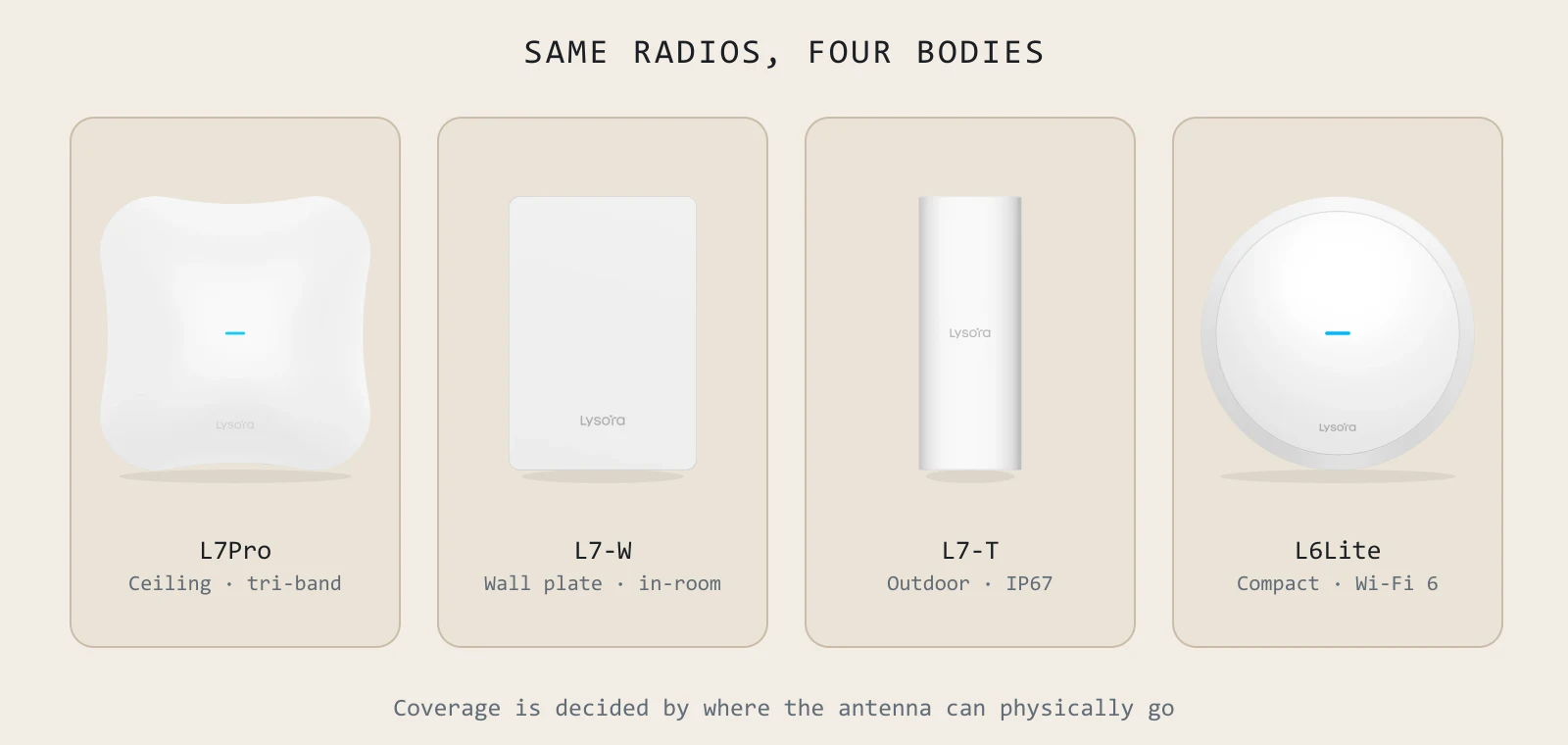
People choose access points the wrong way round. They compare data rates first, pick the biggest number the budget allows, then discover the unit is the wrong shape for the building. The radio is the last decision, not the first — because the space you are covering has already eliminated most of the range before you open a datasheet.
Four bodies, four different problems
Ceiling mount — the default
For open floors, lobbies, classrooms and ballrooms. Mounted centrally and radiating down, this is the highest-capacity option and the one to use wherever you can get a cable into a ceiling. The L7Pro, L7, L7Lite, L6 and L6Lite all take this form.
Wall plate — for rooms, not floors
The L7-W replaces a room's data faceplate: Wi-Fi 7 in an 86 mm body, with a 2.5GbE uplink and four Gigabit LAN ports behind it, one carrying PoE passthrough. It solves two problems at once — coverage that does not have to cross a tiled bathroom wall from the corridor, and the wired ports a room needs for a TV and a desk.
Outdoor — rated, not just weatherproof
Three models, and the difference between them is real. The L6Pro-T is IP68 with an SFP port for a fibre drop to the pole — the highest ingress rating in the range. The L7-T is IP65 Wi-Fi 7 on a single 2.5GBASE-T PoE+ run. The L6-T is IP65, 0.4 kg and 200 mm, with 6.5 dBi antennas for reach where mast weight is the constraint. All three run −30 to +65 °C.
Compact — where one cable is all you get
The L7Lite and L6Lite exist for small rooms, guest Wi-Fi and retail floors. The L7Lite is Wi-Fi 7 on a single 2.5GbE port carrying both data and 802.3at power. The L6Lite is the smallest unit in the range at 175 mm across and 0.4 kg.
 L7ProThe flagship: tri-band Wi-Fi 7 with a 10G SFP+ uplink.
 L7-WIn-room Wi-Fi 7 with four wired ports behind it.
 L7-TIP65 Wi-Fi 7 for courtyards, platforms and yards.
 L6LiteThe budget line for guest Wi-Fi and small rooms.
The whole range, compared
| Model | Generation | Data rate | Uplink | Clients | Body |
|---|---|---|---|---|---|
| L7Pro | Wi-Fi 7 tri-band | 688 + 4323 + 8646 | 2.5GbE + 10GE SFP+ | 600 | Ceiling |
| L7 | Wi-Fi 7 | 688 + 4323 | 2.5GbE + 1GbE | 511 | Ceiling |
| L7Lite | Wi-Fi 7 | 688 + 2882 | 2.5GbE | 100+ | Ceiling, compact |
| L7-W | Wi-Fi 7 | 688 + 2882 | 2.5GbE + 4× LAN | 511 | Wall plate |
| L7-T | Wi-Fi 7 | 688 + 4323 | 2.5GBASE-T | 511 | Outdoor IP65 |
| L6 | Wi-Fi 6 | 573 + 2401 | 1GbE | 512 | Ceiling |
| L6Lite | Wi-Fi 6 | 573 + 1201 | 1GbE | 110+ | Ceiling, compact |
| L6Pro-T | Wi-Fi 6 | 573 + 2401 | 1GbE + 1GbE SFP | 512 | Outdoor IP68 |
| L6-T | Wi-Fi 6 | 573 + 2401 | 1GbE | 110+ | Outdoor IP65 |
How many access points does a floor need?
Floor area alone will not tell you, and any supplier who quotes an AP count from square footage alone is guessing. Four things move the number, often by a factor of two:
- Ceiling height. A 12-metre atrium needs a different count from a 3-metre office of identical floor area.
- Wall construction. Concrete, tile and glass behave nothing like drywall. Heritage buildings and Indian commercial construction are usually the dense end.
- Client density. Assume two to three devices per seat in an Indian office — laptop, phone, and increasingly a headset or tablet.
- What the space is used for. A ballroom sized for its average evening will fall over during the conference the property actually sells.
The honest way to answer it is to model the coverage over your own drawing. Send a floor plan and we run it through Lysora Cloud's AI Designer and send back the heatmap, AP count and placement — free, before any order.
Should you buy Wi-Fi 7 at all?
Only partly, and it depends on something that has nothing to do with the access point: what your client devices are.
Multi-Link Operation, 320 MHz channels and 4096-QAM all need a Wi-Fi 7 client to be used at all. If eighty percent of your laptops are Wi-Fi 6 on a three-year refresh, and your switching is still Gigabit, the AX3000 L6 delivers more per rupee today and the switch upgrade can wait a cycle.
If the budget only stretches to either the access points or the switching, do the switching first and phase the APs. The reverse strands the investment.
What is the difference between the L6Lite and the L6?
Both are Wi-Fi 6 dual-band ceiling units on a single Gigabit port. The L6Lite is AX1800 — 573 plus 1201 Mbps, rated for 110-plus clients, and the smallest in the range at 175 mm. The L6 is AX3000 — 573 plus 2401 Mbps, with up to 512 clients on the 5 GHz radio. Choose the L6Lite for guest Wi-Fi and small rooms, the L6 for open floors and density.
Which Lysora access point is best for a hotel?
The L7-W in guest rooms — one per room, on the wall, with four wired ports behind it — and L7Pro in the lobby, restaurant and ballroom where the constraint is 300 devices in one room rather than coverage. Standardise on one console, not one model.
Do these access points need a controller?
No separate controller appliance. They form a self-organising network scaling to 300 access points and are managed from Lysora Cloud, the local web UI or the mobile app. There is no per-device management subscription.
Can I mix Wi-Fi 6 and Wi-Fi 7 access points?
Yes, and it is often the sensible way to phase a refresh — Wi-Fi 7 where density and client capability justify it, Wi-Fi 6 elsewhere. They sit in the same self-organising network and the same console.
Sizing something specific right now?
Send the floor plan, the camera count or an existing BOQ. You get a coverage heatmap and a line-item quote back, free.