Wi-Fi 7 explained: what actually changed, and what it costs you
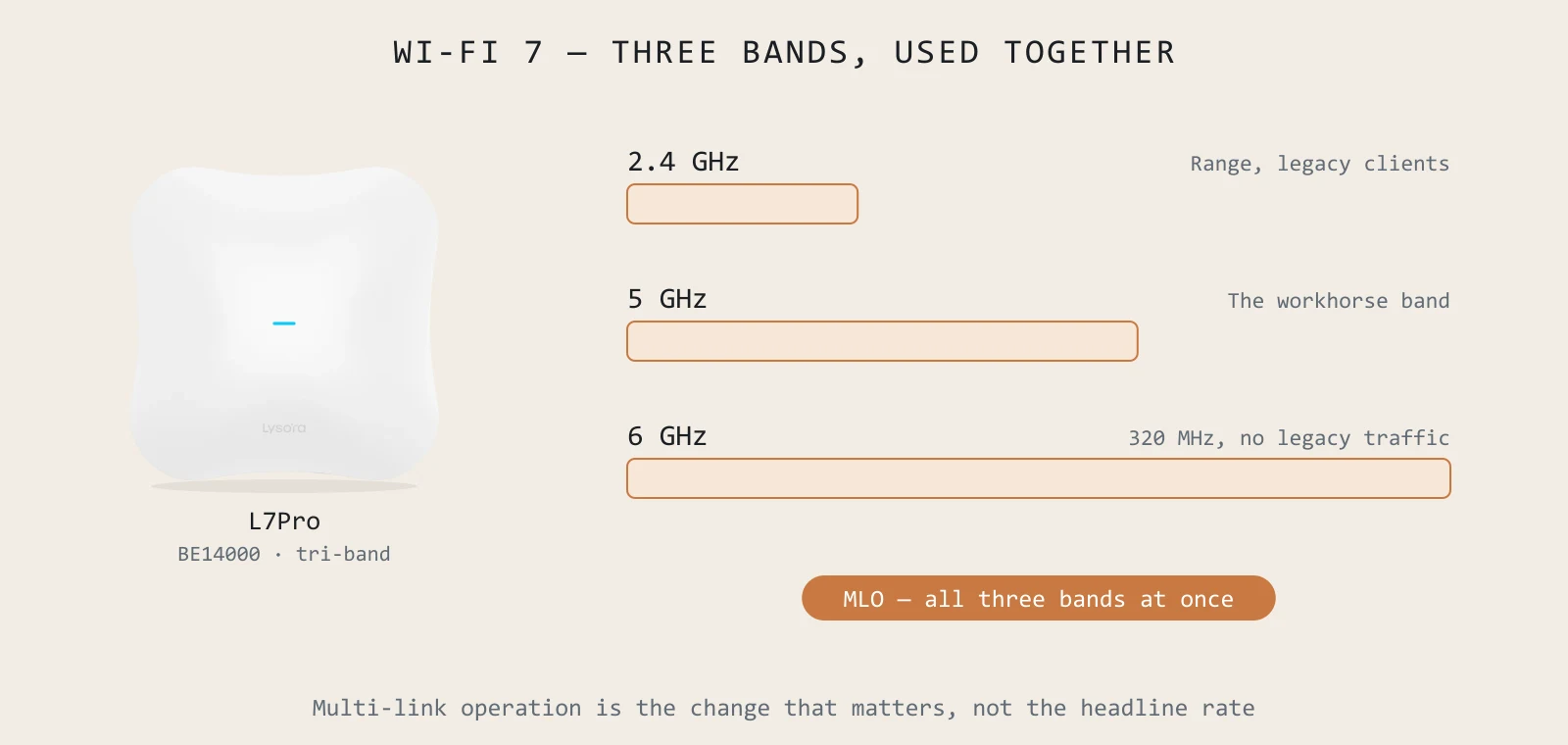
Wi-Fi 7 marketing is unusually number-heavy, and the numbers are real. What the marketing leaves out is that every one of them describes the air interface under ideal conditions — and an air-interface figure only becomes throughput if the wired side behind it was built to carry it.

The three changes that matter
320 MHz channels — and where they exist
Wi-Fi 7 doubles the maximum channel width from 160 to 320 MHz. This is the single largest contributor to the headline rate, and it is only available in the 6 GHz band. That is why a tri-band model like the L7Pro carries a far higher number than a dual-band one — the 6 GHz radio alone accounts for 8646 of its 13,657 Mbps.
Multi-Link Operation — bands used together
This is the change that matters most in daily use, and it is the one the headline numbers describe worst. Before MLO, a client associated to one band and stayed there. With MLO, a capable client transmits and receives across 2.4, 5 and 6 GHz simultaneously.
The practical benefit is usually not peak speed. It is steadier latency — traffic can move off a band that has become congested without re-associating. For a video call or anything real-time, that is the more valuable property, and it is invisible on a speed test.
4096-QAM and preamble puncturing
4096-QAM packs roughly twenty percent more data into each symbol than Wi-Fi 6's 1024-QAM. It needs a clean, strong signal to hold, which means it rewards good access point placement rather than compensating for bad placement — a subtlety worth remembering when someone suggests fewer APs because the new ones are faster.
Preamble puncturing is less glamorous and more consistently useful: when part of a wide channel is occupied, the access point can keep using the rest of it instead of falling back to a narrow channel. In a crowded Indian office block with neighbouring networks on every side, that is a real gain.
What it asks of the wired side
This is the part that turns a Wi-Fi upgrade into a switching project, and the part most quotes leave out.
- At least 2.5G at the access port. Every Lysora Wi-Fi 7 AP has a 2.5GbE uplink; the L7Pro adds 10GE SFP+.
- 10G on the uplink behind it, once several APs share a switch. The LS2P-8MG2XS-P pairs eight 2.5G PoE+ ports with two 10GE SFP+ uplinks — that is the shape most refreshes end up needing.
- More PoE budget than before. The L7Pro draws up to 30 W. A switch comfortably rated for a set of Wi-Fi 6 APs may not carry the same count of Wi-Fi 7 units.
Buying Wi-Fi 7 access points and reusing Gigabit access switches is the most expensive way to not get Wi-Fi 7.
So should you upgrade?
A short, honest checklist. If you answer no to the first two, Wi-Fi 6 is very likely the better spend this cycle.
- 1Are a meaningful share of your client devices Wi-Fi 7? MLO and 320 MHz do nothing for a Wi-Fi 6 laptop.
- 2Can you afford 2.5G access switching at the same time? If not, do the switching first and phase the APs.
- 3Is density actually your problem? Wi-Fi 7 helps most where many devices contend in one space. A sparse office with coverage gaps needs more APs, not newer ones.
- 4Is 6 GHz permitted at your deployment location and date, at the power you are planning for?
Is Wi-Fi 7 worth it if our laptops are Wi-Fi 6?
Partly. A Wi-Fi 7 access point still serves Wi-Fi 6 clients well and gives you headroom as devices refresh. But the distinctive features need a Wi-Fi 7 client to be used at all. If your fleet is mostly Wi-Fi 6 on a three-year cycle and your switching is Gigabit, the AX3000 L6 usually delivers more per rupee today.
Do I need 10G switching for Wi-Fi 7?
You need at least 2.5G at the access port, and 10G on the uplink if several Wi-Fi 7 APs share a switch. 10G to each individual AP is not required — the L7Pro's SFP+ port is headroom for the densest deployments rather than a general requirement.
What is BE14000 and how does it relate to real speed?
It is the sum of the theoretical maximum rates of all three radios — 688 plus 4323 plus 8646 Mbps on the L7Pro. No single client will ever see it. Treat it as a ceiling that tells you how the model ranks against its siblings, not as a throughput figure.
Does Wi-Fi 7 improve range?
Not meaningfully, and 6 GHz is worse through walls than 5 GHz. Wi-Fi 7 improves capacity and latency in the coverage you have. If your problem is dead spots, the answer is AP placement and count — which is what a coverage heatmap is for.
Sizing something specific right now?
Send the floor plan, the camera count or an existing BOQ. You get a coverage heatmap and a line-item quote back, free.