Every Lysora switch, and how to pick the right one
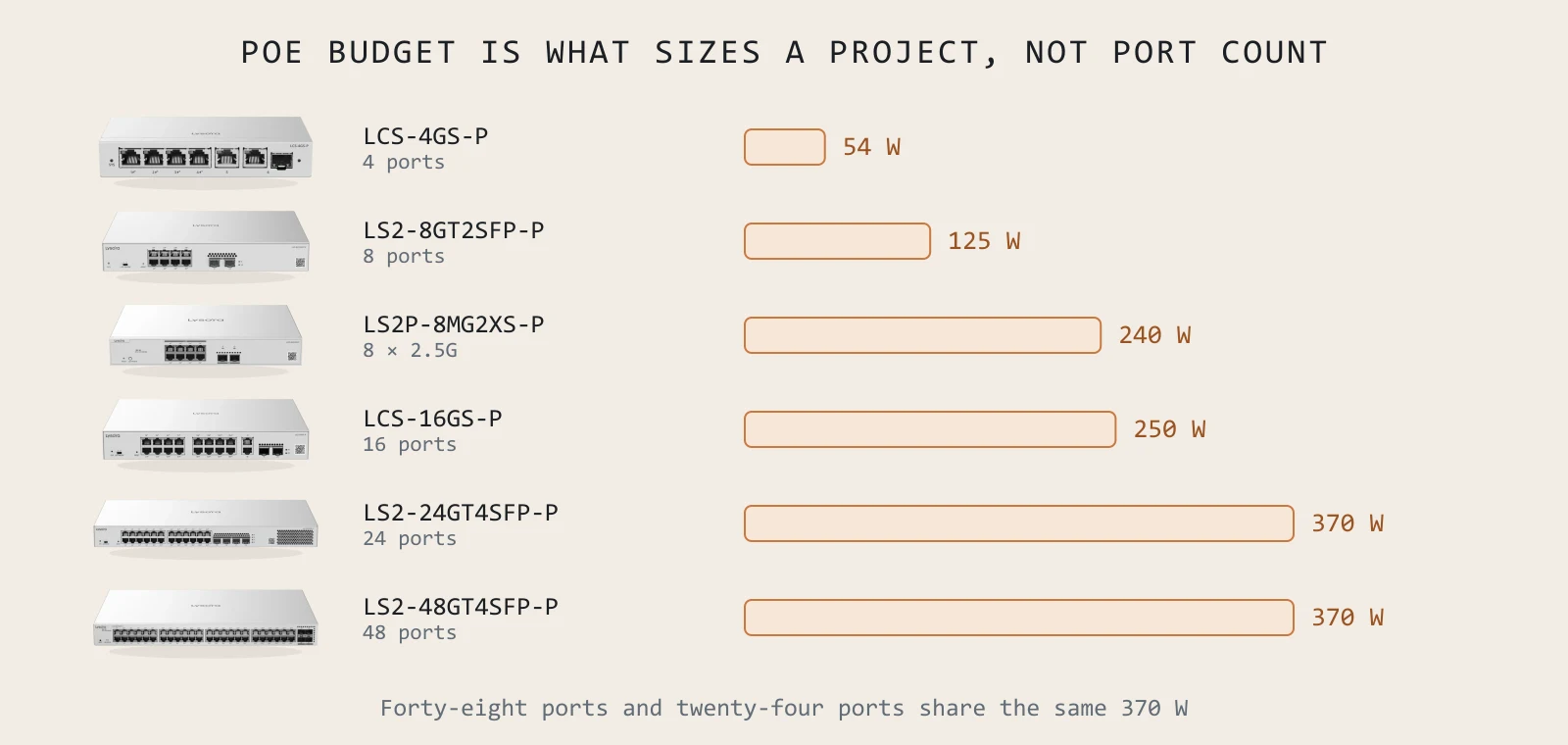
A switch datasheet leads with port count because it is the easiest number to print. It is almost never the number that decides whether the switch will work. This guide goes through the thirteen Lysora switches by what actually separates them — how much power they can deliver, how fast the uplink is, how many VLANs they can carry, and how hot they can get before they stop.
Start with power, not ports
Port count tells you how many devices you can plug in. PoE budget tells you how many you can actually run. These are different numbers and they are rarely close.
Take the LS2-24GT4SFP-P: 24 PoE+ ports sharing a 370 W budget. That averages a little over 15 W per port. A fixed dome camera drawing 8 W is comfortable. A PTZ with a heater drawing 30 W is not — put twelve of those on it and the budget is gone with half the ports still empty.
Lysora publishes a camera-capacity figure per switch at both 200 W and 400 W class, which is unusually useful and worth using. The LS2-24GT4SFP-P is rated for 120 cameras at 200 W class; the 48-port LS2-48GT4SFP-P for 200. Those numbers go into a quote so the budget is checked before the purchase order rather than during handover.

The five families
LCS — cloud managed
Four models, from a 4-port desktop unit with a 54 W budget up to a 24-port rack switch with 370 W. Managed entirely from the cloud console with no CLI. The catch to know about: they cap at 16 VLANs. For a camera closet or a small office that is plenty. The moment someone says the word segmentation seriously, you have outgrown them.
| Model | PoE ports | Budget | Cameras (200 W) | Notes |
|---|---|---|---|---|
| LCS-4GS-P | 4 | 54 W | 40 | Fanless, desk or wall, external supply |
| LCS-8GS-P | 8 | 120 W | 40 | GbE combo plus SFP uplink |
| LCS-16GS-P | 16 | 250 W | 80 | Internal AC — no brick under the rack |
| LCS-24GS-P | 24 | 370 W | 80 | 1U rack, brackets included |
LS2 — Layer 2 managed
The step up that matters: 4094 VLANs instead of 16, DHCP snooping, IP-MAC-port binding and loop prevention. Three sizes — 8, 24 and 48 ports — plus a non-PoE 24-port model for when the devices bring their own power and you only want 21 W of total draw.
| Model | PoE ports | Budget | Uplinks | Notes |
|---|---|---|---|---|
| LS2-8GT2SFP-P | 8 | 125 W | 2× GbE SFP | Fanless, 0–50 °C |
| LS2-24GT4SFP | 24 (no PoE) | — | 4× GbE SFP | 21 W total, silent |
| LS2-24GT4SFP-P | 24 | 370 W | 4× GbE SFP | The workhorse of the range |
| LS2-48GT4SFP-P | 48 | 370 W | 4× GbE SFP | 104 Gbps, 16 K MAC table |
 LCS-4GS-PFanless desktop PoE for a camera closet or a four-desk office.
 LCS-24GS-PRack-mount 24-port cloud PoE with a 370 W budget.
 LS2-48GT4SFP-PForty-eight PoE+ ports for a full floor or a camera aggregation rack.
 LS2T-8GT2SFP-HPDIN-rail Layer 2 PoE rated from −40 to +65 °C.
LS2P — Layer 2+ multi-gig
This is the family that exists because of Wi-Fi 7. A tri-band access point is rated well past 10 Gbps of air capacity; hang it off a Gigabit port and you have bought radios you can never use. Both models give 2.5G access ports with 10GE SFP+ uplinks, plus static routing, 802.1X and IP source guard.
| Model | Access | Uplinks | Budget | Switching |
|---|---|---|---|---|
| LS2P-8MG2XS-P | 8× 2.5G PoE+ | 2× 10GE SFP+ | 240 W | 80 Gbps |
| LS2P-16MG4XS-HP | 16× 2.5G, 4 with PoE++ | 4× 10GE SFP+ | 370 W | 160 Gbps |
The 16-port model is the newest switch in the range and the only one with PoE++ on some ports, which matters for 60 W devices. It is also the only switch in the range with fans rather than passive cooling — worth knowing before you put it in an open office rather than a rack room.
LS3 — Layer 3
One model, and it is the only one in the range that routes properly: static routing plus OSPFv2 and OSPFv3, 24 SFP ports with eight available as RJ45 combo, four 10GE SFP+ uplinks and 128 Gbps of switching capacity. This is the fibre aggregation point for a campus — the thing every floor switch uplinks into.
LS2T and LCST — industrial
DIN-rail, fanless, IP40, and rated where commercial switches derate and then fail. The LS2T is Layer 2 managed and runs −40 to +65 °C, up to +80 °C in a ventilated enclosure. The LCST is cloud managed, runs −40 to +75 °C, and has a PoE++ port within a 300 W maximum.
Uplinks: the part people under-spend on
An access switch is only as useful as the path out of it. Three rules that hold almost everywhere:
- Aggregate on fibre, not copper. Every managed model here has SFP or SFP+ uplinks — use them, and keep recording or backup traffic off the access layer twice over.
- Match the uplink to the access speed. Eight 2.5G ports behind a single Gigabit uplink is the same mistake as a Wi-Fi 7 AP on a Gigabit port, one layer up.
- Terminate uplinks on something that routes. The LS3 with OSPF keeps each floor its own broadcast domain instead of stretching one VLAN across a building.
A worked example
Three-floor office, 40 desks a floor, 12 Wi-Fi 7 access points total, 30 cameras, dual internet circuits. What that comes to:
| Role | Model | Qty | Why |
|---|---|---|---|
| AP access, per floor | LS2P-8MG2XS-P | 3 | 2.5G to each AP, 10G SFP+ to the core |
| Desk access, per floor | LS2-48GT4SFP-P | 3 | Desks, phones and printers on 4094 VLANs |
| Camera access | LS2-24GT4SFP-P | 1 | 370 W, rated for 120 cameras |
| Core | LS3-24SFP/8GT4XS | 1 | OSPF between floors, 4× 10GE SFP+ |
How many cameras will a 24-port PoE switch really run?
Depends on the camera, not the port count. The LS2-24GT4SFP-P has 370 W across 24 PoE+ ports and the manufacturer rates it for 120 cameras at 200 W class or 60 at 400 W class. Send us the camera model in your BOQ and we will size against its actual draw.
Do I need managed switches, or will cloud-managed do?
If you need more than 16 VLANs, 802.1X, or IP-MAC-port binding, you need the LS2 line. If the site is a camera closet or a small office where nobody will ever open a console, the LCS line is cheaper and simpler and there is no shame in it.
Which switch should sit behind Wi-Fi 7 access points?
One with 2.5G access ports — the LS2P-8MG2XS-P for a floor, or the LS2P-16MG4XS-HP where you need sixteen and PoE++ headroom. A Gigabit port caps a tri-band Wi-Fi 7 AP far below what it is rated for, and the symptom reads as a Wi-Fi problem for months.
Are Lysora switches NDAA compliant?
Most, but it varies by model and you should check the specific one. Of the thirteen switches, the four LCS models, the LS2-24GT4SFP-P, both LS2P models, the LS3 and the LCST industrial model carry it. Each product page states it as the manufacturer does.
Sizing something specific right now?
Send the floor plan, the camera count or an existing BOQ. You get a coverage heatmap and a line-item quote back, free.