PoE budget explained: the number that decides a camera project
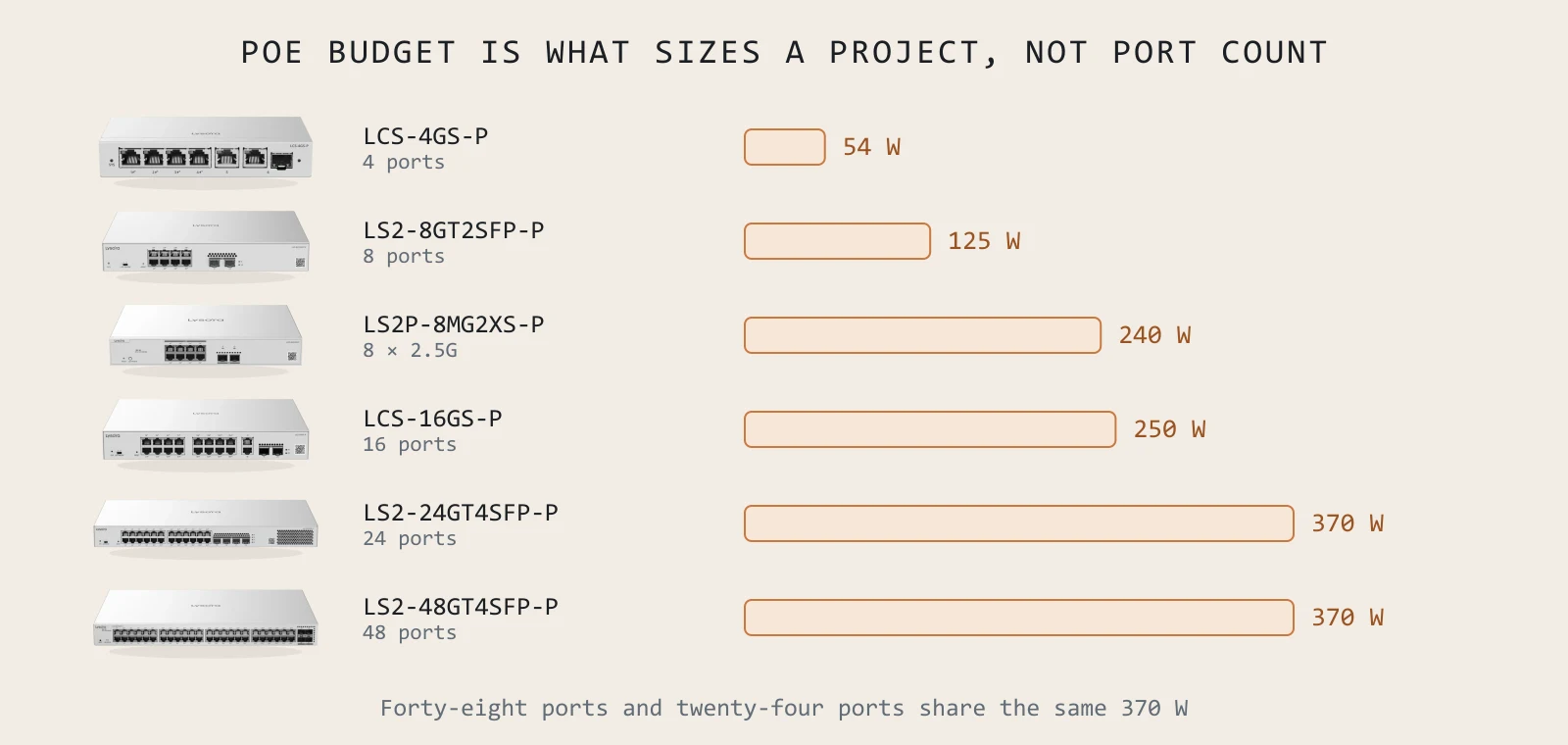
Camera projects fail on power, not bandwidth. Video is undemanding — a dozen H.265 streams barely trouble a Gigabit link. What runs out is watts, and it usually runs out after dark, weeks after the install was signed off.
The classes, briefly
| Standard | Common name | At the port | At the device | Typical load |
|---|---|---|---|---|
| 802.3af | PoE | 15.4 W | 12.95 W | Fixed dome, VoIP phone, small AP |
| 802.3at | PoE+ | 30 W | 25.5 W | PTZ, Wi-Fi 6/7 AP, camera with heater |
| 802.3bt | PoE++ | 60–90 W | 51–71 W | Multi-radio AP, PTZ with heater and wiper, small displays |
The gap between the two columns is cable loss — up to fifteen percent over a full-length run. Size against what the device needs at its end, not what the switch puts out at its own.
Per-port capability is not the budget
This is the whole point. A switch advertises PoE+ on every port, which is true: any one port can deliver 30 W. It does not mean every port can, simultaneously. That is the total budget, and it is a separate, much smaller number.
The LS2-24GT4SFP-P has 24 PoE+ ports and a 370 W budget. Twenty-four ports at 30 W would be 720 W. So the honest reading is: any port can give 30 W, and the switch as a whole can give 370 W, and you must plan against the second number.

Do the arithmetic against the night
The load you must clear is not the daytime average. It is the moment after dusk when every IR illuminator comes on at once, every heater is running in January, and every PTZ is moving because that is when things happen.
- 1List each camera model and its maximum draw — the datasheet figure with IR and heater active, not idle.
- 2Add them. This is your peak load.
- 3Add fifteen percent for cable loss on long runs.
- 4Add twenty percent headroom. Camera counts grow; nobody has ever specified a surveillance system that later shrank.
- 5Pick a switch whose total budget clears that figure. Then check the port count separately.
The 100-metre limit, and what to do past it
Ethernet stops at 100 metres. Gate cameras, perimeter poles, warehouse ends and second blocks are routinely further, and the honest options are fibre with a media converter at each end, or a wireless span.
For a single distant camera, the CPE3-P is often the neat answer: a 3 km 5 GHz link with a 15.4 W PoE output at the far end, so the camera is powered by the bridge and no supply is needed at the pole.
PoE watchdog: the feature that pays for itself
IP cameras lock up. It is not a defect so much as a fact of embedded devices left running for years. On an unmanaged switch the fix is a person physically unplugging a cable.
PoE watchdog pings each powered device and power-cycles the port when it stops answering. The camera reboots by itself in under a minute. On a remote site, that is the difference between an unnoticed self-recovery and a half-day visit for a thirty-second fix. It is configurable per port from the cloud console on the LCS line.
A five-line checklist
- Budget, not ports. Add up real device draw at peak and clear it with headroom.
- Night draw, not day draw. IR and heaters are the load that matters.
- Watchdog on every camera port. It removes a whole class of site visit.
- Cameras on their own VLAN, with DHCP snooping and IP-MAC-port binding.
- Past 100 m, plan a span — fibre or 5 GHz — before quoting, not after surveying.
How many cameras can a 370 W switch run?
Divide 370 by the real peak draw of your camera, then subtract headroom. Eight-watt fixed domes: comfortably 35–40. Thirty-watt PTZs with heaters: about ten. The manufacturer's own figure for the LS2-24GT4SFP-P is 120 at 200 W class, which assumes small cameras — check it against your actual model.
What happens when a PoE budget is exceeded?
The switch sheds load, usually by priority or port order, and drops power to the lowest-priority ports. Those devices go offline. Because it happens at peak draw, it typically happens at night and looks intermittent, which is what makes it expensive to diagnose after the fact.
Can I use PoE injectors instead of a bigger switch?
For one or two devices, yes. Beyond that you are building a rack of power bricks with no central visibility, no watchdog and no per-port monitoring — and injectors fail silently. Past a handful of devices a properly sized switch is cheaper and far easier to support.
Does PoE budget affect access points too?
Increasingly, yes. A Wi-Fi 7 tri-band AP like the L7Pro draws up to 30 W — comparable to a PTZ. A switch comfortably sized for a set of Wi-Fi 6 access points may not carry the same count of Wi-Fi 7 units, which catches people out mid-refresh.
Sizing something specific right now?
Send the floor plan, the camera count or an existing BOQ. You get a coverage heatmap and a line-item quote back, free.